Poolhound is a remote pool management, chemistry tracking and analytics tool for one pool and its spa — one address for the equipment panel, and one record of every reading, every dose and what happened next.
Reach a pool controller that has no password of its own, safely, from anywhere.
Dose from what this pool actually does rather than from a chart written for somebody else's.
Find out how much water there really is, which every dose figure multiplies through.
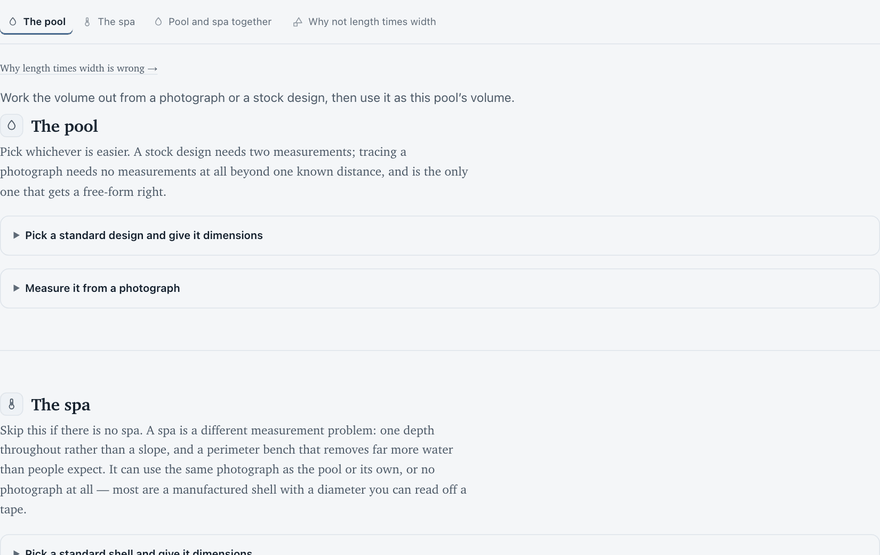
Work out how much water a pool actually holds, from a photograph you trace or from a stock design and two measurements. Nothing is uploaded or kept: the picture is processed and discarded within the same request.
The pool
Pick whichever is easier. A stock design needs two measurements; tracing a photograph needs no measurements at all beyond one known distance, and is the only one that gets a free-form right.
Pick a standard design and give it dimensions
For when you know the shape and the size but have no overhead
photograph. Each design is stored as an outline, not a formula — scaling it
by your two dimensions produces the same kind of shape the tracing tool produces,
so it goes down identical code from there: the same long-axis detection, the same
slicing, the same area-weighted depth.
The percentage under each is how much of its bounding box the shape
actually fills. That is the honest version of the trade's "free-form factor" —
measured from the outline rather than remembered as 0.85.
Pick a design to start.
Pick a design and set the
dimensions.
The volume is calculated here either way — that
runs on the server and needs no sign-in. Saving it as this pool's volume
is what needs the write API: sign in, or start it locally with
bin/serve.
Measure it from a photograph
Length × width × average depth is exact for a rectangle and
wrong for everything else — on a curved pool it can overstate the water by a third,
and the trade's habit of multiplying by 0.85 is a guess about a shape nobody
measured. Tracing the actual waterline replaces that guess with the real enclosed
area, which is the term the volume is most sensitive to.
One real measurement is still needed. A photograph cannot
supply scale — a small pool photographed close and a large one photographed far away
produce identical pixels, and knowing the phone does not help, because focal length
fixes the camera's angle of view rather than its distance. Measure any one distance
with a tape, click its two ends below, and everything else follows.
A satellite screenshot of your own address is
the easiest overhead shot to get and needs no rectifying. A photo from the deck works
too — use Rectify to mark four corners of anything you know is a rectangle on
the water's plane, or the perspective will distort the area.
Click two points you have measured.
The floor falls from A to B.
Click its four corners, clockwise from the near-left.
The floor, which the photograph cannot see
The floor is taken to fall steadily from one end
to the other. That single assumption is all the depth model needs, because the shape
supplies the rest: the outline is sliced across its long axis and each slice
contributes its own real surface area at its own depth. A wide shallow end therefore
pulls the average down on its own, without anyone having to estimate what share of the
water is shallow.
Flat sections, if the floor is not a plain ramp
Steps and a tanning ledge in the pool
Their footprint is removed from the body and
added back at its own shallow depth, rather than shaved off as a percentage. A ledge
is often 60–80 sq ft at ten inches; counted as pool floor it is water you do not
have, and that error only runs one way.
Measuring a spa? It has its own section
below — it is a different shape of problem and gets its own answer.
Trace the outline and set the
scale to see a volume.
Trace the waterline, then set the scale.
The volume is calculated here either way — that
runs on the server and needs no sign-in. Saving it as this pool's volume
is what needs the write API: sign in, or start it locally with
bin/serve.
The spa
Skip this if there is no spa. A spa is a different measurement problem: one depth throughout rather than a slope, and a perimeter bench that removes far more water than people expect. It can use the same photograph as the pool or its own, or no photograph at all — most are a manufactured shell with a diameter you can read off a tape.
Pick a standard shell and give it dimensions
Pick a shell to start, or trace one on the
photograph above using its Spa outline button.
A bench
around the inside is normal and takes real volume with it.
Measure it from a photograph
Use the pool's photograph if the spa is in
it, or a picture of its own — a spa that sits away from the pool will not be
in the same frame, and forcing one shot to hold both is how you end up with a spa
eleven pixels across. A traced rim wins over a shell: if you trace one, that is
what gets calculated.
Click around the rim of the spa.
There is no Find the water for me
here on purpose. That works by colour, and a small pale spa usually will not
separate from wet deck at this scale — it would fail more often than it
worked. A rim is a dozen clicks.
Pick a shell and set the
measurements.
Pick a shell, or trace one on a photograph.
Pool and spa together
Pool—gal+Spa—gal=Total—gal
Cost to refill—
$
Water is usually billed per CCF or per 1,000 gallons — check the unit above matches your bill. This is the water only: it does not include sewer charges, which some utilities bill on water used, nor the chemicals to balance a fresh fill.
Why not length times width
Volume is area times average depth, and of those two terms the area is both the larger and the easier to get badly wrong. A rectangle is exact. Anything with a curve in it is not: on a kidney or a free-form, length times width can overstate the water by a third, because it measures the box the pool sits in rather than the pool.
The trade’s answer is to multiply by 0.85. That number is a guess about a shape nobody measured, and it gets applied identically to a lagoon and a Grecian — which differ by more than twenty per cent in how much of their bounding box they actually fill. Tracing the waterline replaces the guess with the enclosed area, which is the term the answer is most sensitive to.
Depth is treated as a gradual slope from one end to the other, which is what almost every residential pool is. Steps, benches and a spa are handled separately, because each is a volume that a single average depth gets wrong in a predictable direction.
Why it matters: every dose on the Pool chemistry tab is parts per million, and parts per million of the wrong volume is the wrong dose. A pool assumed to be 15,000 gallons that actually holds 12,000 gets twenty-five per cent more acid than it asked for, every time.
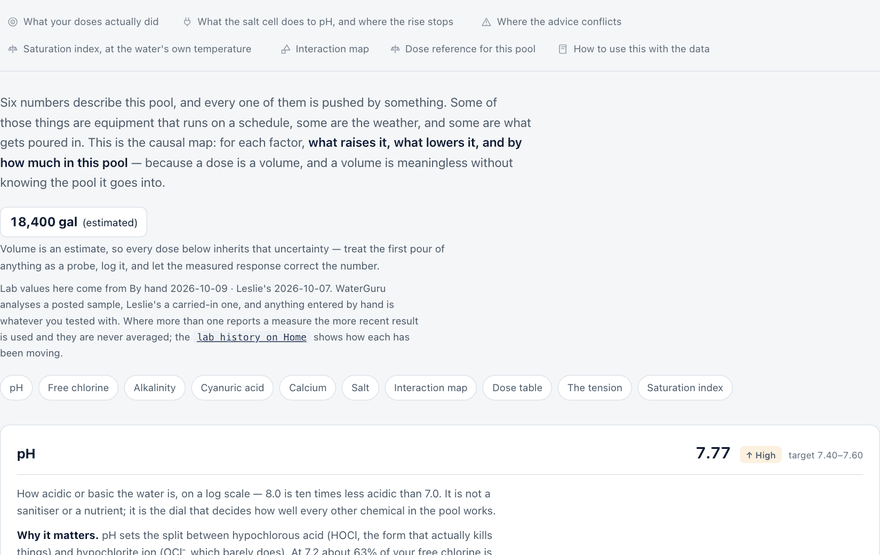
Six numbers describe this pool, and every one of them is pushed by
something. Some of those things are equipment that runs on a schedule, some are the
weather, and some are what gets poured in. This is the causal map: for each factor,
what raises it, what lowers it, and by how much in this pool — because a dose
is a volume, and a volume is meaningless without knowing the pool it goes into.
15,000 gal (estimated)
Volume is an estimate, so every dose below inherits that uncertainty — treat the first pour of anything as a probe, log it, and let the measured response correct the number.
Lab values here come from WaterGuru 2026-10-24.
WaterGuru analyses a posted sample, Leslie's a carried-in one, and anything entered
by hand is whatever you tested with. Where more than one reports a measure the more
recent result is used and they are never averaged; the
lab history on Home(needs sign-in — not on this page) shows how each has been
moving.
How acidic or basic the water is, on a log scale — 8.0 is ten times less acidic than 7.0. It is not a sanitiser or a nutrient; it is the dial that decides how well every other chemical in the pool works.
Why it matters. pH sets the split between hypochlorous acid (HOCl, the form that actually kills things) and hypochlorite ion (OCl⁻, which barely does). At 7.2 about 63% of your free chlorine is HOCl; at 7.5, 50%; at 7.8, roughly 30%; at 8.0, 22%. Every test reads the same total either way. This is why a pool can show plenty of chlorine and still go cloudy — and it is the single strongest argument for keeping pH down.
▲ What raises it
Salt cell electrolysisdominant
At the cathode the cell splits water and releases hydrogen gas, leaving hydroxide behind. The chlorine cycle would be pH-neutral if everything stayed in the pool, but the H₂ bubbles off, so the alkalinity does not get consumed back. Rate tracks cell output × pump hours.
Aeration — the spa spillover above alldominant
Pool water carries more dissolved CO₂ than it would at equilibrium with air. Anything that breaks the surface drives CO₂ out, carbonic acid goes with it, and pH climbs — with no change in alkalinity at all. On this pool the spillover runs the entire time the pump runs, so this is a constant, not an occasional event. The sheer descent and the spa jets stack on top of it.
Total alkalinitymoderate
TA is the reservoir of dissolved CO₂ available to be lost, so the higher it is the faster pH rebounds after acid. At 91 this pool is above the 60–90 a salt pool wants, and that excess is actively feeding the climb.
Warm water — including both heatersmoderate
CO₂ is less soluble as water warms, so heating drives it out of solution: the same mechanism as aeration arriving through a different door. Nothing the burner produces touches the water, so the effect is purely thermal, which means solar gain does it too — on a sunny day the sun heats this pool harder than the heater does. Water temperature is measured directly, so the fit uses that rather than heater hours as a proxy.
Cal-hypo shock, soda ash, fresh plasterminor
Cal-hypo slurry is around pH 11.7 and lifts pH as it dissolves. Soda ash (sodium carbonate) is the deliberate way to raise pH, rarely needed on a salt pool. Plaster leaches lime for months after a resurface.
▼ What lowers it
Muriatic aciddominant
The working tool. Roughly 16 fl oz of 31.45% acid per 0.1 pH in this pool, which also costs about 4 ppm of alkalinity each time. Pour it slowly over a return jet with the pump running, never into the skimmer.
Acid plus aeration, used deliberatelymoderate
The one way to lower alkalinity without ending up with low pH. Acid drops both; aeration then brings pH back while leaving TA where it fell. Repeat. This pool aerates continuously by design, so the second half of the trick happens for free — it is the practical route from 91 down toward 75.
Rain, fill water, trichlorminor
Rain is mildly acidic and dilutes. Trichlor tablets are strongly acidic (pH 2.8) but drag CYA up with them, which is why they are the wrong tool on a pool that already has a cell.
Note. Two forces pull pH in opposite directions here. Chlorine effectiveness wants it low. The saturation index wants it high, and at 292 ppm of calcium — inside the 250–450 this pool wants — there is room to give it some. See the tension section below.
Free chlorine
2.1 ppm oktarget 2.1–4.1
Chlorine still available to sanitise, as opposed to chlorine already spent on something. On a salt pool it is made continuously by the cell rather than poured in.
Why it matters. Free chlorine is the only thing standing between the pool and algae or pathogens, but its target is not a fixed number — it is a fraction of cyanuric acid. CYA binds chlorine into a reservoir that UV cannot destroy, releasing it slowly, so more CYA demands more FC to keep the same active concentration.
▲ What raises it
Salt cell output × pump hoursdominant
The product is what matters, not either alone: 40% for 8 hours and 80% for 4 hours put nearly the same chlorine in the water. Cell output is higher in spa mode on this system, which is the one condition that separates cell output from pump hours — and therefore the only natural experiment available for telling the two effects apart.
Liquid chlorinemoderate
About 15 fl oz of 12.5% per 1 ppm here; 2.4 qt (77 fl oz) takes the pool up 5 ppm. Adds nothing but salt.
Cal-hypo shockmoderate
About 3 oz of 73% per 1 ppm. It also adds roughly 0.7 ppm of calcium hardness per ppm of chlorine, which at this pool's measured 292 ppm is neither much help nor much harm.
Cool water, cloud, no swimmersminor
Not a source; an absence of demand. FC holds where it would otherwise fall.
▼ What lowers it
Sunlightdominant
UV destroys unprotected chlorine within hours. CYA is the shield and the protection curve is steep at the bottom: near zero CYA a pool can lose most of its FC in an afternoon, while the curve flattens above about 30. At CYA 41 this pool is properly protected.
Organic loaddominant
Leaves, pollen, sunscreen, sweat, urine, algae. Every gram of it consumes chlorine permanently. Bather load after a party is visible in the next day's reading.
Ammonia and chloraminesmoderate
Chlorine binds to nitrogen compounds, becomes combined chlorine, and stops sanitising. Clearing it needs enough FC to reach breakpoint — roughly ten times the combined chlorine — not a token dose.
Warm water — including both heatersmoderate
Every reaction that consumes chlorine runs faster. Demand in August is not the same pool as demand in March, and a heated pool carries a higher standing demand than a cold one at identical sun and CYA.
Phosphates and metalsminor
Phosphate is 208 ppb; algae feed on it and algae eat chlorine, though below roughly 500 ppb it is not the binding constraint. Copper and iron catalyse chlorine loss and stain surfaces.
Note. High pH does not lower free chlorine — it lowers what free chlorine can do. A pool at 6.2 ppm and pH 7.8 has less active sanitiser than one at 4 ppm and pH 7.4.
Total alkalinity
91 ppm↑ hightarget 60–90
Dissolved carbonates and bicarbonates — the water's resistance to pH change, and the reservoir that feeds pH back up after acid.
Why it matters. TA is why pH is stubborn, and also why it keeps coming back. Too low and pH swings wildly on nothing; too high and pH climbs relentlessly no matter how much acid goes in. Salt pools want the lower end, 70–80, precisely because the cell is a permanent upward push.
▲ What raises it
Sodium bicarbonate (baking soda)dominant
About 2.1 lb per 10 ppm here. Raises TA strongly and pH barely — the reason it is the standard tool.
Soda ashmoderate
Raises both TA and pH; use only when both are low.
Fill waterminor
Municipal water often arrives at TA 80–120 and top-ups after evaporation slowly pull the pool toward it.
▼ What lowers it
Muriatic aciddominant
About 1.2 qt (39 fl oz) of 31.45% per 10 ppm of TA in this pool — the same pour that moves pH about 0.25.
Acid plus aerationdominant
The one way to lower alkalinity without ending up with low pH. Acid drops both; aeration then brings pH back while leaving TA where it fell. Repeat. This pool aerates continuously by design, so the second half of the trick happens for free — it is the practical route from 91 down toward 75.
Dilutionminor
Rain overflow and refills, if the fill water is softer than the pool.
Note. Aeration alone never lowers TA. It only raises pH. Every claim that 'aerating brings alkalinity down' is really describing the acid half of the cycle.
Cyanuric acid
41 ppm oktarget 30–80
Chlorine stabiliser. It bonds reversibly to chlorine, hiding it from UV and releasing it as the free chlorine is consumed.
Why it matters. CYA sets the free-chlorine target — this is the single most misunderstood relationship in pool care. The rule for a salt pool is FC between 5% and 10% of CYA, aiming near 7.5%. At CYA 41 that is 2.1–4.1 ppm, aim 3.1. Note that the 30–80 band shown for CYA itself is a general recommendation, not a figure worked out from this pool — it is the one target on this page that does not adapt. The free-chlorine band above it does, which is why the two are worth reading together.
▲ What raises it
Stabiliser, added deliberatelydominant
About 1.2 lb per 10 ppm here. It dissolves slowly — expect a week before the test catches up, and do not re-dose in the meantime.
Trichlor tablets and dichlormoderate
Each carries CYA in with the chlorine. Convenient at first, then the CYA creeps past 80 and the FC requirement climbs with it. On a salt pool there is no reason to use them at all.
▼ What lowers it
Draining and refillingdominant
The only practical route. CYA is not consumed, not filtered, not burned off. Replacing a third of the water removes a third of the CYA.
Slow biological breakdownminor
Real but unreliable — some pools lose 10–20 ppm over a winter, others none.
Note. Nothing you can buy removes CYA. Every dose is effectively permanent, so under-dose and re-test rather than the reverse.
Calcium hardness
292 ppm oktarget 250–450
Dissolved calcium. Not a sanitiser and not a nuisance — a structural requirement for plaster, tile grout and any exposed concrete.
Why it matters. Water that is short of calcium takes it from wherever it can: plaster, grout, the surface of a pebble finish. The damage is invisible for years and then it is etching. Too much and calcium precipitates as scale on the salt cell plates, where it cuts output.
▲ What raises it
Calcium chloridedominant
About 1.8 lb of 77% flake per 10 ppm here. Dissolve in a bucket first; it gets hot.
Cal-hypo shockmoderate
Every shock quietly raises calcium — a real advantage when hardness is on the low side.
Evaporationmoderate
Water leaves; calcium stays. Hardness only ever climbs between refills.
▼ What lowers it
Dilutiondominant
Drain and refill, exactly as with CYA.
Deliberate precipitationminor
Possible with flocculants at high pH, messy, and not worth it at this pool's level.
Note. Low calcium is the quiet half of this pool's pH problem. It is what makes a low pH aggressive, and therefore what forces pH to sit higher than the chlorine would like.
Salt
3963 ppm oktarget 3000–4000
Sodium chloride in solution — the cell's raw material. At these levels it is about a tenth of seawater and barely tasteable.
Why it matters. The cell converts chloride to chlorine, the chlorine does its work and reverts to chloride. Salt is a catalyst in practice, not a consumable. Too little and the cell throttles back or refuses to run; too much and it corrodes fittings and trips the controller.
▲ What raises it
Pool saltdominant
About 12.5 lb per 100 ppm here. Brush it off the floor and run the pump for a day before re-testing.
Evaporationmoderate
Concentrates whatever is already dissolved.
▼ What lowers it
Water loss that carries salt outdominant
Splash-out, backwashing, rain overflow, draining. Not evaporation — that leaves salt behind.
Rainminor
Dilutes only if the pool overflows.
Note. If salt reads low and no water has left the pool, suspect the sensor before the salt — cell probes drift as they scale up.
What your doses actually did
Every logged addition against the reading that followed it. This is
the table the rest of the page is working towards: until a dose is checked against
the water, every figure here is a textbook number applied to an estimated volume —
plausible, unverified, and wrong in whichever direction this pool happens to differ.
The measurements so far moved pH harder than predicted. Working
backwards from the most recent, this pool takes
about 5 fl oz of 31.45% muriatic per
0.1 pH, against an estimate of 16 fl oz. Believe the estimate for now
— 6 doses, read
1.9 hours later with the pump running only part of the day,
is not a fit. Acid needs a full turnover to mix, and a pod sitting in the skimmer
sees whatever is nearest it.
Two other readings of the same number are possible and only more doses will separate them: the pool may hold less water than the 15,000 gallons configured, which would make every dose stronger than predicted; or the alkalinity may be lower than the 91 ppm last measured, which buffers less and does the same thing. Both are worth knowing, and both show up as this ratio staying above one.
What the salt cell does to pH, and where the rise stops
Two things worth separating, because they behave differently and
the difference decides what turning the cell down will actually achieve.
Turning the cell down slows the climb; it does not pull pH back. The cell raises pH because the hydrogen it makes at the cathode leaves as gas, so the hydroxide that came with it is never neutralised — and because those bubbles aerate. Both scale with output multiplied by pump hours, so halving the dial halves the push. But removing a riser is not the same as adding an acid: on its own it lets pH level off, and something acidic — rain, fresh fill water, or acid you pour — is still what brings a number down.
Where the rise stops. Aeration can only drive off the CO₂ the water is actually carrying. At alkalinity 91 ppm that runs out around pH 8.5, and no amount of spillover will push past it — the pool simply sits there. Taking alkalinity down to 76 would move the ceiling to about 8.4. That is a second and far more concrete reason for the alkalinity a salt pool wants than "it buffers less": it says where pH will stop.
Where this pool is. pH 8.10 against a ceiling near 8.5. There is still headroom, so the spillover is doing real work on pH and the cell is not the only driver.
What the pod has recorded. Free chlorine 6.2 → 2.1 ppm across 51 readings, which is the fall a reduced cell output would produce. pH 7.80 → 8.10. 51 readings is not a trend, and this is exactly the case the logging exists to settle — a fortnight at the new output will show whether the climb stopped, reversed, or merely paused.
The one real fall in the record. The lab has pH 7.5 on 2026-10-19 and 7.2 on 2026-10-24 — a genuine drop with no acid logged. Free chlorine fell with it, 5.2 to 4.3 ppm, which is consistent with less production.
Where the advice conflicts
Correct rules can still contradict each other. This is the one that
matters here.
The tension this pool is actually in
Two correct pieces of advice point in opposite directions, and following either one alone makes something worse.
Chlorine wants pH down
At pH 8.1, roughly 22% of free chlorine is in the
active HOCl form. At 7.4 it would be 52%. The measured 2.1 ppm is therefore doing the work of about 0.5 ppm today, against 1.1 ppm if pH were 7.4 — the same chlorine, most of it switched off.
The plaster wants pH up
Saturation index moves one-for-one with pH: dropping pH by 0.7 drops SI by 0.7. WaterGuru last reported SI -0.2, so pH 7.4 at today's calcium of 292 ppm would put the water near -0.9 — aggressive enough to pull calcium out of plaster and grout rather than deposit it.
The way out is not a pH number. Raise calcium hardness toward 350 ppm — about 10.4 lb of 77% calcium chloride — and the saturation index gains roughly 0.08, which buys the room to hold pH at 7.5 without the water turning aggressive. Then bring alkalinity from 91 down toward 75 using acid plus the aeration this pool already produces for free, so pH stops climbing back so fast. Calcium first, alkalinity second, pH last — pH is the symptom.
Saturation index, at the water's own temperature
Whether the water is dissolving the plaster or scaling the heater
depends on how warm it is, and the same water does both across a year.
The saturation index says whether water
is short of calcium carbonate — and will take it from plaster and grout — or
carrying more than it can hold, and will leave it as scale. Between
-0.3 and +0.3 it is balanced. It is
Langelier's index: pH minus the pH at which this water would be exactly
saturated, and that saturation pH is built from four terms — temperature,
calcium, carbonate alkalinity and total dissolved solids.
Carbonate, not total, alkalinity.
The alkalinity test also counts cyanuric acid, which buffers but cannot hold
calcium in solution. How much of it the test counts depends on pH, so the
correction is computed at the measured pH rather than as a flat third of the
CYA — per ppm of CYA, it is:
At
ppm of TA per ppm CYA
pH 7.2
0.26
pH 7.5
0.31
pH 7.8
0.35
Temperature is the term that moves
on its own. Warm water holds less calcium carbonate, so the same water reads
higher hot and lower cold. A handbook example pool — pH 7.5, calcium
300, alkalinity 100, no stabiliser; not this pool — at
three temperatures:
Water
Index
Reads as
55°F
-0.25
balanced
84°F
+0.06
balanced
104°F
+0.27
balanced
Which is why one number from a lab
counter is not the answer: the plaster cares what the index is on the coldest
night, and the heater exchanger cares what it is at the spa's setpoint.
Interaction map
Every driver down the side, every factor across the top. A cell shows
the direction that driver pushes that factor, and how many marks it carries is how
much that driver matters — + minor, ++ moderate, +++ dominant, the
same three words the driver cards use. Read a row to
see what one action does to the whole pool at once — the reason no single dose is
ever a single change.
+ raises− lowers· no direct effectone mark minor · two moderate · three dominant
Dose reference for this pool
Computed from 15,000 gallons (estimated), not copied from a generic chart.
These are starting estimates — poolhound replaces them with this pool's measured
response as logged doses accumulate, which is the entire point of logging them.
Add
Amount
Effect
Muriatic acid 31.45%
16 fl oz
lowers pH 0.1 (and TA ~4 ppm)
Muriatic acid 31.45%
1.2 qt (39 fl oz)
lowers TA 10 ppm (and pH ~0.25)
Muriatic acid 14.5%
1.1 qt (34 fl oz)
lowers pH 0.1 — half strength, double the pour
Sodium bicarbonate
2.1 lb
raises TA 10 ppm
Liquid chlorine 12.5%
15 fl oz
raises FC 1 ppm
Liquid chlorine 12.5%
2.4 qt (77 fl oz)
raises FC 5 ppm — a shock dose
Cal-hypo 73%
3 oz
raises FC 1 ppm, CH ~0.7 ppm
Calcium chloride 77%
1.8 lb
raises CH 10 ppm
Stabiliser (CYA)
1.2 lb
raises CYA 10 ppm — slow, do not re-dose early
Pool salt
12.5 lb
raises salt 100 ppm
Adding one of these? Log it on Chemicals(needs sign-in — not on this page) — a dose that is recorded is a change the model can attribute, and one that is not is noise it has to absorb.
How to use this with the data
The heaters are in here twice on purpose.
They appear as a driver in their own right and again as "warm water", because they
act only through temperature — and so does the sun. Water temperature is sampled
directly, so the fit can use the thing that actually causes the effect instead of
heater runtime standing in for it, and can then report whether heater hours add
anything beyond the temperature they produce.
Everything above is textbook direction with
arithmetic on this pool's volume. What it cannot tell you is the size of the
coefficients here — how much pH this particular spillover adds per hour,
or what the cell really produces at 40%. That only comes from pairing daily
chemistry against daily runtime, which is what the dashboard collects. Log every
addition with its strength; the fit is only as good as the record of what went in.
Three pieces: the panel, the Pi and the web server
The Pi starts every connection to the server. It sends readings up every fifteen minutes and collects commands on the way back, so nothing on the internet can reach the pool directly. The full picture is further down.
What poolhound is for
Three problems. They belong to the same pool, which is why
one tool holds all three — but they are not the same problem, and most of
what is written about pools answers only the middle one.
Replace the panel's remote with any browser
The panel is driven by its PDA: one handheld, in one place, and whoever is holding it. Poolhound puts the same circuits and setpoints in any phone or browser, at one address that works from the garden or from another country — no port forwarding, no VPN, nothing to install. The panel itself is never exposed: a sampler on the house network connects outward and waits. It is built on AqualinkD, the open-source project that speaks the panel's undocumented RS485 protocol; poolhound adds the sign-in, the outward connection and the record of what was done.
Dose from what this pool actually does
Every dose is recorded with what happened next, so the advice is fitted to this pool's own response rather than read off a band written for a pool nobody here has seen. Where two labs disagree that is kept as a disagreement, not averaged into a number neither of them reported.
Know how much water there really is
Every dose figure multiplies through the volume, so a guess there is a wrong answer everywhere else. Trace a photograph of the pool or pick a stock shape, and get an uncertainty band instead of one confident number. Pool and spa are measured separately.
Underneath all three is one record: every reading, every dose,
and what happened next. The output is a small number of things worth doing,
each with an amount, and each traceable back to the measurement that asked
for it.
What it reads
Four sources, none of which agrees with the others all the
time. Where two instruments disagree that is recorded as a disagreement — it
is usually the pool having moved between the two dates — and neither is
quietly averaged away or called wrong.
The pool panel
A sampler on a Raspberry Pi reads the controller on the house network and pushes readings outward. Water and air temperature, what is running, what every setpoint is, and the salt cell's output.
A sensor in the water
A floating pod measures free chlorine and pH continuously and posts a water sample away for a full panel every few weeks.
A counter test
Results from carrying a sample in to a pool store, which measures things no daily sensor covers — alkalinity, cyanuric acid, calcium, salt.
What was actually poured in
Every dose, logged with its strength and its amount. This is the half that makes the rest fittable: without knowing what went in, a change in the water is an observation rather than a measurement.
What it looks like
These are a pool that does not
exist. Every figure below is rendered from a synthetic dataset by
bin/screenshots, so nothing on this page is anybody's real
water. The live screens look like this and hold real readings.
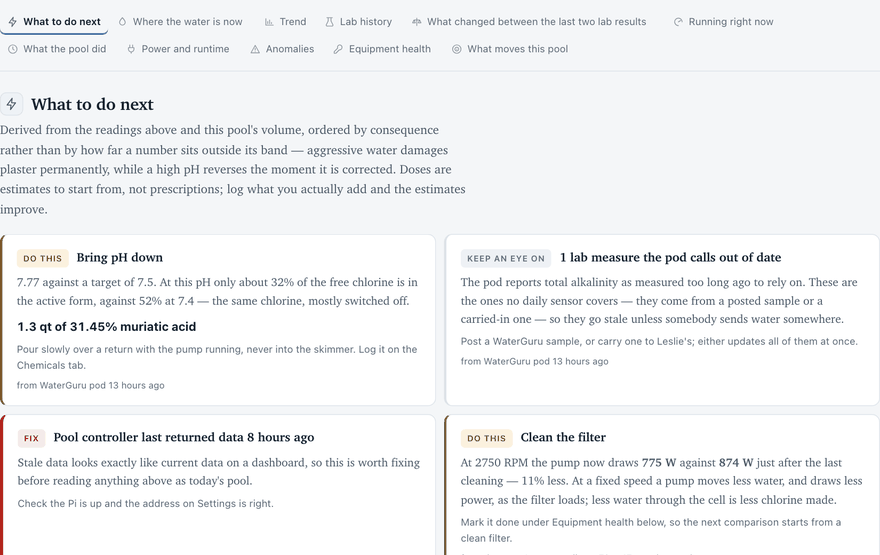
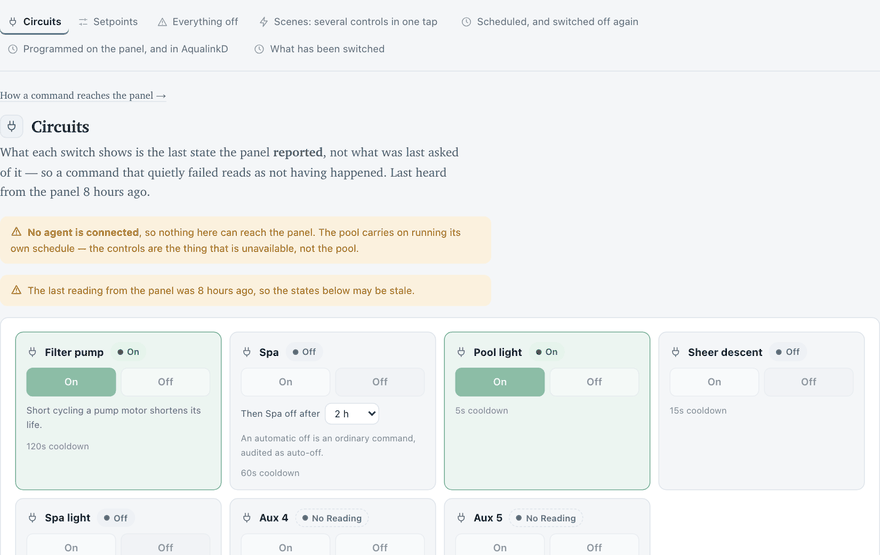
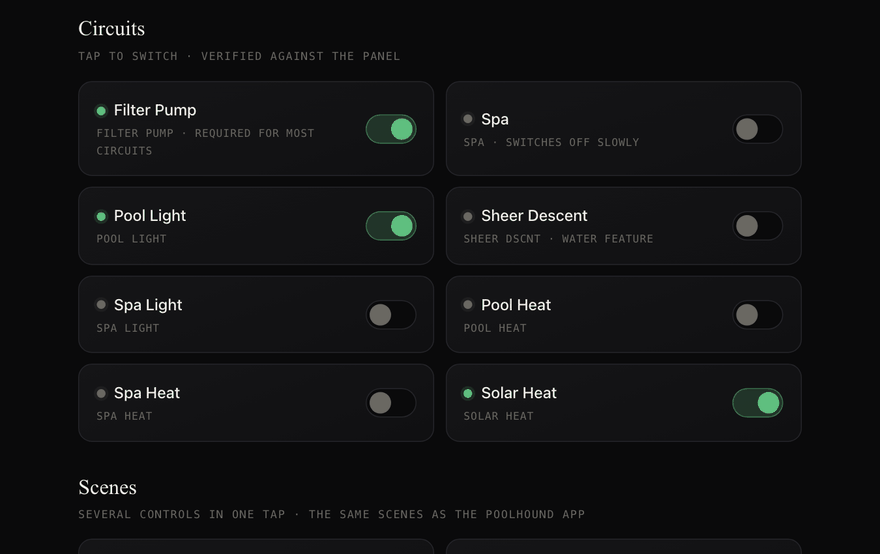
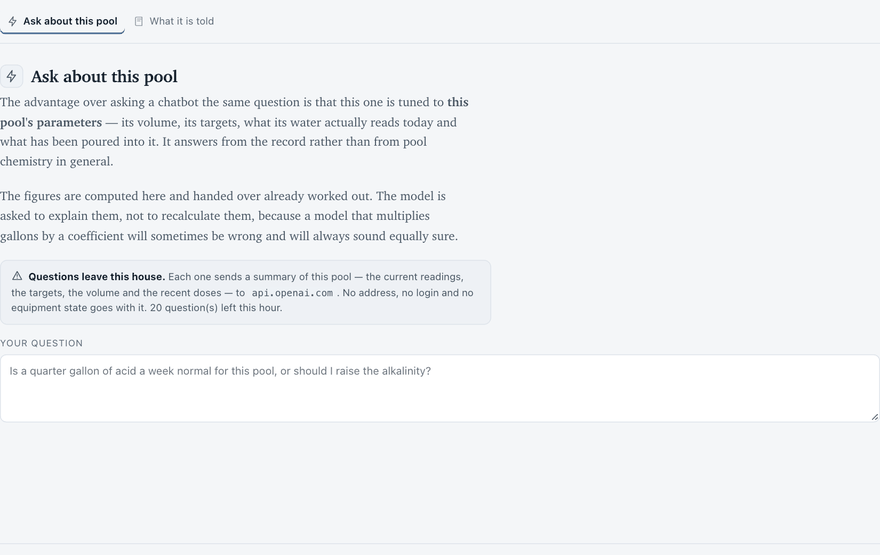
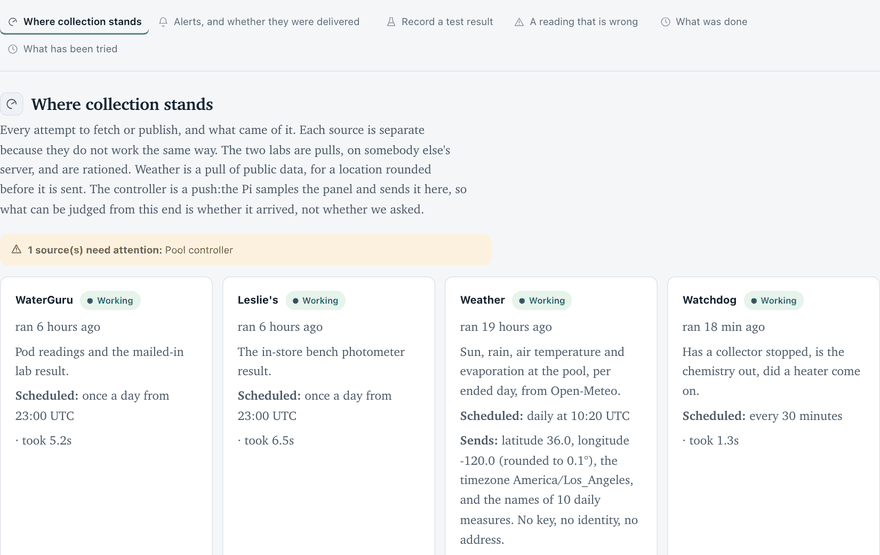
Home(needs sign-in — not on this page) What to do next, ordered by consequence rather than by how far a number sits outside its band — and the dose that would do it, computed for this pool's volume rather than read off a chart.Pool control(needs sign-in — not on this page) Every circuit and every setpoint the panel exposes, with what the panel itself last reported beside what it was asked for. A command that has not been confirmed says so.poolhound local Optional, and installed by nothing here: a page served by the Pi itself, on the house network, talking to AqualinkD directly. It works when the internet does not, and shows poolhound's record of every change at the panel. poolhound runs the same without it; a copy is in deploy/poolhound-local.html.Pool chemistry The reference half — what each measure does, what moves it, and how the six of them pull against each other. Public, because it is the part that is useful to somebody else's pool too.Pool Volume Calculator Trace a photograph of a pool, or pick a stock shape. Every dose on every other screen is a volume multiplied by a coefficient, so this is the number the rest of it rests on.Ask AI(needs sign-in — not on this page) The advantage over asking a chatbot is that it is tuned to THIS pool's parameters — its volume, its targets, its actual readings and the doses that have gone in. It answers from the record rather than from pool chemistry in general, and the screen prints everything it sends.Collection(needs sign-in — not on this page) Every attempt to fetch anything, whether it worked or not — including whether an alarm that was raised actually reached somebody.
What you can use here
Three of these screens need no sign-in, because they are the
part that is useful to a pool that is not this one.
Pool Volume Calculator —
trace a photograph or pick a stock shape, and get a volume with an honest
uncertainty band rather than a single confident number.
Pool chemistry —
what each measure does, what moves it, how far, and why the six of them
cannot all be satisfied at once.
Guide — how this one is built,
down to the wiring and the adapter, if you want to build the same
thing.
How it is put together
Five pieces and the direction of every arrow. The one that
matters is the arrow out of the house: the equipment panel has no password of
its own, so nothing outside opens a connection toward it — the Pi pushes
a sample out every fifteen minutes and holds one connection open for commands
to come back down.
The pair of arrows across the dashed line is the whole design. The Pi pushes a sample out every fifteen minutes and holds one connection open for commands to come back down it; nothing outside the house ever opens a connection toward the pool. The arrow at the top of the pool is the other half of the truth: AqualinkD serves its own web interface on the Pi, so a browser already on the house network controls the panel without poolhound in the path — which is why being on that network is the thing this design treats as privileged.
Python and its standard library, almost entirely. The pages
are rendered to static files — this one and a second one with the private
screens in it, which is a different file rather than the same page with
things hidden. The equipment panel has no authentication of its own, so it is
never exposed and never proxied: the sampler on the house network connects
outward and waits. The readings live on network storage that outlives the
machine serving them.
The long version, including the parts list and the wiring, is
on Guide.
What poolhound is for, then what it is made of — how this pool is wired, configured and recovered. The hardware half is written at the panel from what it actually did, so it can be read with the breaker off and no internet.
What this is for
Three problems, and the tab that answers each
poolhound exists to solve three specific problems with running this pool. Everything on the page is one of them; nothing here is a general pool-care guide, because there are better ones and this one would go stale.
The problem
Where it is answered
What it does
Reaching the controller from anywhere
Pool control(needs sign-in — not on this page)
The panel's own software has no password of its own, so it can never be exposed to the internet. A small agent in the house connects OUTWARD to this site and waits, which means nothing on the internet can open a connection toward the pool. Covered in detail below.
Dosing from this pool's own response
Home(needs sign-in — not on this page) and Pool chemistry
A chart tells you a number; this works out what to do about it, for this pool's actual volume, against the targets a salt pool wants rather than a generic band. Log what you pour on Chemicals(needs sign-in — not on this page) and the page compares what was predicted with what the water then did.
Every dose figure multiplies through the volume, so a guess there is a wrong answer everywhere. Trace a photograph or pick a stock design and it measures the real shape, with an uncertainty band. Open to anybody — it knows nothing about this pool and needs no sign-in.
The volume calculator is deliberately public. It is useful to any pool owner, it reads nothing and stores nothing, and there is no reason to put a login in front of arithmetic.
What each tab does
One decision per tab, and what you can author there
five tabs are public and read-only. Six more appear once you are signed in, and those are the ones that change something.
The tabs, in the order they appear. “Authored here” is the thing that only exists because a person typed it — everything else is collected.
Tab
The decision it answers
Authored here
Home(needs sign-in — not on this page)
What, if anything, needs doing today. It opens with What to do next, which ranks the measurements that are off target by how much waiting costs rather than by how far off they are, and it says which lab and which date each ranking came from. Below that: where the water is now, the trend, lab history as small multiples, what changed between the last two lab results, what is running right now, what the pool did, Power and runtime — pump hours and what they cost — and how close the model is to having enough doses to fit this pool's own response.
Nothing. Home only reads.
Pool control(needs sign-in — not on this page)
Switch something, from wherever you are. Two halves: Circuits, which are on or off, and Setpoints, which carry a number — pool heater, spa heater, freeze protection and salt cell output, each with the panel's range, a cooldown and the panel's own readback. Both are enumerated in full further down this page. There is an everything-off, and a log of what has been switched and by whom.
Commands. Every one is recorded with the identity that sent it.
Settings(needs sign-in — not on this page)
Only what you change. The pool's volume and targets, how often each lab is checked, the logins (kept encrypted, never displayed back), notifications, and a copy of everything to download. It held the status and the logs as well until those moved to Collection, which is where the record belongs — this tab had grown to four things you change and four you only read.
Settings and credentials.
Chemicals(needs sign-in — not on this page)
Record what you poured, so the next answer can be better than a table. A dose is the input half of the measurement: without it the response cannot be attributed and the model has nothing to fit. The catalogue knows the phases and refuses a unit that does not belong to one — a solid has no gallons. Below the log, what upkeep takes: acid, baking soda, salt and stabiliser per week and per year, each worked out from this pool's doses, pH and runtime, and each saying how it is known. And what is on the shelf: the last count, plus what was bought since, minus the doses logged since, and how many weeks that lasts at the upkeep rate.
Doses, purchases and counts. These are the rows in this product that are EDITED in place rather than corrected, because they are the record of something you did and nothing should put a wrong amount back.
Ask AI(needs sign-in — not on this page)
A question answered against this pool's own record. The current readings with their source and age, the targets, the volume and the recent doses are computed here and handed to a language model already worked out; it is asked to explain them, not to recalculate them. The tab prints the whole context it sends, so what leaves the house is on the screen rather than described. It does nothing until an API key is stored, and it speaks to any OpenAI-compatible endpoint — including one running on your own network, which is how to ask questions with nothing leaving at all.
Nothing. The question is sent and the answer is shown; neither is written to the record.
Collection(needs sign-in — not on this page)
Did the data actually arrive, and is any of it wrong. One card per source with when it last ran, what it returned and how often it is meant to run, then every attempt as a table — written from a finally, so a collector that crashes is on the record rather than being the reason there is no record. Alarms are listed with whether a notifier actually carried them, because an alarm raised and not delivered is a quiet night that was not quiet. A test you ran yourself is entered here too, because a hand-typed result is a third source alongside the two collectors.
Hand-typed test results, and corrections to any reading.
What this is, for somebody who has not been told. The public address lands here: what the product measures, where each number comes from, and what the screens look like. The figures on it are rendered from a synthetic pool by bin/screenshots and say so, so the page that explains the product is not also a publication of this household's water.
How much water there actually is. Every dose figure multiplies through the volume, so a guess there is a wrong answer everywhere. Trace the outline on a photograph or pick a stock shape; it slices the outline rather than assuming length × width × 0.85, subtracts a ledge at its own depth, and returns an uncertainty band. Pool and spa are measured separately and reported separately. The totals card closes with what a refill would cost — with a unit beside the rate, because a water bill quotes per CCF or per 1,000 gallons and almost never per gallon.
The traced outline, if you are signed in. It is saved as pool_shape.json and is the only thing in the export that was made by hand rather than collected. An anonymous visitor gets the arithmetic and nothing is stored.
What to pour, and why. What the last doses actually did, what the salt cell does to pH and where the rise stops, where the common advice conflicts, the interaction map, and a dose reference worked for this pool's volume against the targets a salt pool wants rather than a generic band.
Nothing. The dose arithmetic is read from one catalogue and displayed.
How the whole thing works, and how to build one. The architecture, every control the panel exposes, the parts list, the wiring, the adapter, what is safe and what is not, and what each of the other tabs is for — this table. Public, in full: an explanation that needs a sign-in explains nothing to the person deciding whether to trust it.
What to rely on this for, and what it keeps about you. Chemical and remote-control safety, the no-warranty licence, the fact that there is no support, and what the site records and sends where — each statement checked against what the code does. The footer on every tab links to each of its three sections.
Nothing.
Recording a test you ran yourself
The Collection tab carries Record a test result. A strip, a drop kit or a reading from a pool shop is a third source alongside the two collectors — it lands in its own file, it is never mixed into either lab's history, and it is ranked against them by date the same way they are ranked against each other.
Correcting a reading that is wrong
The same tab carries A reading that is wrong — a fouled sample, a pod misreading, a test run on the spa by mistake. It is not a delete, and that is not fussiness: both labs return their whole history on every pull and the collectors match on the measurement timestamp, so a row deleted from the file is put back by the next collection. The fix appears to work and undoes itself overnight. A correction is recorded instead, and applied every time the data is read — to the tiles, the charts, the targets and the tables alike. The original is kept, because the record of what the lab said is not the same thing as the number we believe.
Getting your data out
Settings → Your data downloads everything poolhound has recorded as the CSV files it stores — the actual record rather than a report, so it stays readable without this program. Every table on Home carries its own download beside its row count. The export includes the corrections log and the audit trail, and it says in its own readme what it leaves out.
The one alert nobody asked for
Notifications are mostly about things you did or things that stopped. Freeze protection is the exception and it is on by default. The panel starts the pump by itself when the air is cold enough to risk ice in the plumbing, at whatever hour that happens, and poolhound mails you when it does. Nothing is wrong when that arrives — it is the one piece of equipment here that nobody scheduled and nobody pressed a button for, which is what makes it worth telling you about, and it runs until the air warms up so it can add hours the schedule did not ask for. If it fires in daylight in summer, the sensor or the setpoint is wrong. Its setpoint is on Pool control(needs sign-in — not on this page) and the notification can be switched off on Settings(needs sign-in — not on this page).
When the equipment is doing something it should not
Separately from slow wear, poolhound watches the panel’s samples for things that break equipment, are unsafe or burn gas for nothing this hour: a heater firing with the pump stopped, a heater firing and the water not warming, the spa above 104 °F, freezing air with the pump stopped, a sudden change in what the pump draws at its speed, the pump not running for a day, and a heater or the spa left on far past any soak. The serious ones notify once when they start and once when they end; the rest — a light left on, a sensor stuck at one value — are listed on Home and notify only if asked. Every threshold is set under [anomaly] in the configuration file, and samples arrive every fifteen minutes, so anything shorter is not seen.
Who may do what
Signing in says who; an access policy says what they may do. There are three levels — view reads the private tabs and changes nothing, operate switches equipment, logs doses, records readings and fixes a bad one, and admin adds settings, credentials and the export. The split that matters is between acting on the pool and changing what the product knows: a guest may be trusted to turn the spa on and not to read the household's whole history.
Roles are opt-in. An install that has never written a policy behaves as it always did — everyone the sign-in admits is an administrator — because defaulting to deny would lock owners out of their own pool on an upgrade, which is a worse failure discovered at a worse moment. Once any name is listed the policy is live and an unlisted person drops to the lowest level. Settings(needs sign-in — not on this page) says which of the two states this install is in. The policy is edited in the configuration file and deliberately not through this page.
Is this safe?
Reaching the pool without exposing it
The pool controller has no password of its own — not a weak one, none. Anything that can reach it on the house network can start the spa heater. So poolhound never makes it reachable: there is no forwarded port, nothing on the internet can open a connection toward the pool, and there is no VPN onto the network it sits on.
Instead the Pi opens one connection outward to this site and waits on it. Commands travel back down inside the connection the pool itself opened.
What each layer refuses. The agent has the last word because it is the only check an attacker cannot skip by talking to something else.
Layer
Refuses
The page
Offers only buttons built from the shared catalogue, so an unsupported control cannot be drawn.
This server
Shape, device, range, age, and a ceiling of 12 commands a minute.
The agent, at the pool
All of the above again, plus per-device cooldowns, and a command it has already run. Commands expire after 5 minutes, so one captured now cannot be replayed later. Both of those outlive the agent process, so restarting it — which every deploy does — cannot wave a cooldown through or let a resend run twice.
What that does not protect against, said plainly: anybody on your home network can still reach the controller directly — that is what it is. Anybody this site lets in gets full pool control unless an access policy has been set — roles are opt-in, and Settings(needs sign-in — not on this page) says which state this install is in. And somebody who took over the server could send commands the agent would accept — but they could reach nothing else in the house, because there is no route, no tunnel and no credential pointing that way. The pool also keeps running its own schedule regardless: losing this site loses the remote control and nothing else.
The longer argument, including why a VPN is not the answer here, is in the project README.
The parts, and how they connect
The pool, the server, and Azure
The system runs in three places, and most of what is confusing about it stops being confusing once you know which is which. At the pool are the panel and a Raspberry Pi. On the server are the proxy that decides who may do what and the application that renders this page. In Azure are the readings and the passwords — deliberately not on the server. Everything else in the drawing is somebody else's service being read once a day.
The pair of arrows across the dashed line is the whole design. The Pi pushes a sample out every fifteen minutes and holds one connection open for commands to come back down it; nothing outside the house ever opens a connection toward the pool. The arrow at the top of the pool is the other half of the truth: AqualinkD serves its own web interface on the Pi, so a browser already on the house network controls the panel without poolhound in the path — which is why being on that network is the thing this design treats as privileged.
The pair of arrows in the middle is the design, and the rest follows from it. Nothing outside the house ever opens a connection toward the pool. The Pi pushes a sample out every fifteen minutes and holds one connection open for commands to travel back down; there is no port forward, no tunnel, and the server has no route in. The reason is the box next to it: AqualinkD has no authentication of any kind, so anything that can reach it can start the spa heater and burn gas. A design in which the server could reach into the house would be a design in which taking the server means taking the pool.
The same thing, with every service named
The drawing above is the shape; this one is the reference. It names the units that run on the Pi, the three classes the proxy sorts every arrival into, what is inside the container, when each collector runs, and the two things that deliberately do not live on the server. Everything in it is also written out below, one section per box.
Which of the three classes a request falls into is decided at the proxy rather than by the application, and the private list is written out path by path rather than as “everything except the public ones”. A path the list does not name is still proxied through — the last rule is a catch-all — and is then refused by poolhound itself, which issues no session token to a caller the proxy did not vouch for and requires admin for any route its own policy does not mention. So forgetting to list one costs a layer rather than opening a door, and bin/selftest compares the two lists so it cannot go unnoticed. The classes are the table below.
What each piece is for. The last three are not on the server, which is what makes the server disposable: it can be rebuilt from the repository and nothing is lost.
Piece
Where it runs
What it does
Jandy panel
at the pool
Runs the pump, the salt cell, the heaters, the lights and the valves, and holds the schedule. It is the only part of this that actually controls anything; everything else either watches it or asks it.
AqualinkD
a Raspberry Pi, at the pool
Speaks RS485 to the panel at 9600 baud and offers an HTTP API on port 8000 of every interface of the Pi, so anything on the house network can reach it. It has no authentication of any kind — which is why it is never exposed to the internet, never proxied, and why the rest of this is shaped the way it is.
poolhound-agent
the same Pi
Reads AqualinkD every 15 minutes and pushes the sample out to the server, and holds one long-lived outbound connection on which commands arrive. Both connections are opened from this end. It writes nothing to the SD card — two have already died of write wear — so its state lives in /run, which is RAM. That state is the interlocks: which commands have already run, and when each device last changed. It is written to a file there rather than kept in memory, because every deploy restarts this process and a restart used to clear the gas heater's cooldown.
Caddy
the server
Terminates TLS and sorts every request into one of the three classes below before anything else sees it. It also strips the identity headers the application trusts, on every request, so that only Caddy can set them — and then presents a shared secret of its own, AFTER that strip, which the application checks before it reads any identity header. Stripping alone happens on the vhost, which is a path only traffic from outside takes; the secret is what makes an identity provable rather than inferred from which network the request arrived on.
oauth2-proxy
the server
The sign-in gate, backed by Entra ID. It stands in front of the private half and deliberately not in front of the agent's path, for the reason in the second table.
poolhound
the server, in a container
This application. It renders both builds of the site, serves them, and holds the queue a command waits in until the agent collects it.
Azure Files share
Azure, mounted on the server
The CSVs: equipment samples, pod readings, lab results and doses. Not on the server's disk, so rebuilding the server costs nothing but a render.
Azure Key Vault
Azure, read by managed identity
The service passwords and the agent's token, fetched at the moment they are needed. No application credential is in the image, in the compose file, or on the host. The one exception is the share's own mount key, which has to be on disk at 0600 for the mount to come back after a reboot — it cannot be fetched from a vault that is itself reached over the network.
WaterGuru, Leslie's
their own services
Pod readings and a mailed-in lab from one; an in-store bench photometer from the other. Pulled once a day. Their results are never averaged together — two labs disagreeing is data, not error.
Three classes of request
Which class a request falls into is decided at the proxy rather than by this application, and the private list is written out path by path rather than as "everything except the public ones". A path the list does not name is still proxied through — the last rule is a catch-all — and is then refused by poolhound itself, which issues no session token to a caller the proxy did not vouch for and requires admin for any route its own policy does not mention. So forgetting to list one costs a layer rather than opening a door, and bin/selftest compares the two lists so it cannot go unnoticed.
Class
Who
How it is let through
Public
anyone
The stats, the chemistry reference and the volume calculator. No sign-in, on purpose: a reference nobody can open explains this pool to nobody.
Private
you, via Entra ID
The controls, the dose log and the settings — and the build of this page that contains them, which is a different file rather than the same file with tabs hidden.
Agent
the Pi
/api/agent/*, on a bearer token checked by the application itself. It has to bypass the sign-in gate entirely, because oauth2-proxy answers a machine with an HTML sign-in page — which the agent cannot satisfy and would retry for ever.
What stops a command being something the panel should not be asked to do is a separate question, and it is at the end of this tab: How this page reaches the pool.
Building it. Everything above is about using the page. Everything below is about the hardware it talks to — the panel, the two wires, the adapter and the daemon. It is written from what this equipment actually did rather than from what the manual claims, and it is carried in the page rather than in a file on a laptop because it is read at the panel, with the breaker off and often with no working internet.
The pool controller
Jandy Aqualink, PDA-6 Combo
AqualinkD talks to the Jandy panel over an RS485 pair at 9600 baud through a USB adapter on the Pi. It reads temperatures, pump RPM and watts and the salt cell, it can switch the auxiliary circuits, and it holds a schedule. Everything else in this application sits on top of that one serial link.
AqualinkD is not part of poolhound. It is an independent open-source project by Shaun Feakes and its contributors, and it does the genuinely hard part: the Jandy RS485 protocol is undocumented, and AqualinkD reverse-engineered it into a clean local HTTP API. Without it none of the equipment data on this page exists and none of the controls work — poolhound simply reads its /api and issues PUTs to it. If you have a Jandy or Zodiac panel it is worth your time: the project, the protocol notes and the wiki.
These are the panel's own names, listed from the same vocabulary the agent validates against, so this table cannot fall behind the product. Do not rename them in aqualinkd.conf, for the reason below.
Circuit
What it is
FILTER PUMP
Jandy ePump, variable speed, bound at pump ID 0x78
SPA
Spa
AUX1
Pool light
AUX2
Sheer descent
AUX3
Spa light
AUX4
Unused, and never renamed — the control that proves the mechanism below
AUX5
Unused, and never renamed
Do not rename circuits in the config
This is a PDA panel, and in PDA mode AqualinkD does not address circuits numerically. It navigates the on-screen EQUIPMENT menu and matches on label text. A label that does not match the panel's own wording does not merely misname a circuit — it sends the command somewhere else.
This was tried, with friendly names for AUX1 to AUX3, and it went wrong in both possible ways at once. POOL LIGHT and SHEER DESCENT matched nothing in the menu, so those circuits silently stopped responding. SPA LIGHT was worse: it contains the word SPA, matched the panel's SPA entry, and switched on the spa and the spa heater — burning gas — every time the spa light was pressed.
If you want friendly names, rename the circuits on the panel itself. AqualinkD reads them from the menu and everything downstream, this application included, inherits them safely.
The clock
AqualinkD runs with sync_panel_time = yes, so it writes the Pi's local time into the panel. The Pi shipped set to Europe/London and was eight hours ahead for its first month, which the panel simply believed — every schedule ran at the wrong time and nothing reported an error. Both now read America/Los_Angeles, which is also the zone the server's container is pinned to — two of this product's answers are local-time answers. Check the whole chain agrees:
# the Pi and the panel should report the same wall clockssh pi@your-pi.local 'date; curl -s localhost:8000/api/status | jq -r .time'
The panel’s own programs
Schedules that survive everything else
There are two kinds of equipment schedule in this house, and both are kept. The panel’s own programs are stored in the Jandy panel and run by it: they keep the filter pump on its hours when the Pi, AqualinkD or this site are down, which is what they are for. AqualinkD’s schedules are cron entries on the Pi that press a button through AqualinkD; easier to edit, and they stop with the Pi. Both are shown, side by side, on Pool control(needs sign-in — not on this page). There, a panel program’s on and off times can be changed too; adding or deleting a program, its days, and AqualinkD’s schedules are changed at the panel or in AqualinkD.
Use the panel’s programs first. The two kinds do not know about each other, so equipment scheduled in both is switched on two timetables and one undoes the other; Pool control says so when it sees it. Put the regular hours — the pump, the heaters — in the panel, where they survive everything, and keep AqualinkD’s schedules for what the panel cannot do.
Stock AqualinkD can switch circuits but cannot read the panel’s programs. A small patch to it, kept with this project, adds a reader that walks the handheld’s menus exactly as a person would, read only, and answers GET /api/programs. The same patch can change a program’s on and off times through the panel’s own editor, checking every key press against what the panel redraws, and the change counts only when the panel, read back, agrees. Both routes that act are HTTP PUT only, so a page in somebody’s browser on the house network cannot fire one. The agent asks it to walk the menus about once every 24 hours, because a walk holds the panel’s menus for about a minute and a button pressed meanwhile waits behind it. It reports both kinds every 30 minutes.
Read off this panel, one key at a time, viewing only. The times on screen 4 are the ones it held when it was mapped, not a live reading.
The six keys of the PDA handheld, as AqualinkD sends them. The reader uses four of them, and only ever presses Select on the home screen and the main menu — where AqualinkD’s own menu code checks which screen is showing first — and on the PROGRAM device list.
Key
Code
Used by the reader for
Up
0x06
nothing
Down
0x05
moving along a list
Select
0x04
opening MENU, PROGRAM and each device
Back
0x02
leaving a device’s screen
Page up
0x03
nothing
Page down
0x01
nothing
Never Select on a device’s program screen
Every selectable line there acts: ADD PROGRAM, DELETE PROGRAM, CHANGE PROGRAM, and the cursor lands on ADD. The reader presses Back. And on the home screen the cursor starts on POOL MODE, where Select switches the pool; that is why the reader goes through AqualinkD’s own navigation, which waits for the screen to be the one it expects, rather than counting key presses.
Three things the map does not show, and the reader handles. The device list is a ring: past its bottom line the panel scrolls one line and keeps the cursor there, and after the last device it comes back round to the first, which is how the reader knows it has seen them all. A device screen arrives in pieces — the ADD/DELETE/CHANGE lines first, the title and the times last — so it is read only once the panel has finished drawing it. And a device’s title is its own name, so POOL HEAT’s program screen begins with the same line as the pool heater’s setpoint screen; the reader recognises a program screen by its ADD PROGRAM line before anything else is tried.
The long form, with every screen line by line, is docs/JANDY-PROGRAMS.md; the patch, its build and its tests are in deploy/aqualinkd.
What you need to buy
Required, optional, and what each one buys
Three groups, and only the first is needed for the thing most people come here for. Nothing on this page is affiliated with anything; the links go to whoever makes the part.
To control the pool
This is the half that switches circuits and sets the heaters. All three are required, and the panel is the one you cannot buy your way into — either the pool already has a compatible controller or this project is not for it.
Required, all three. The adapter has its own section below; it is the one part with a wiring trap in it.
Get the captive-cable version, not a bare module. Distributor links are in The USB adapter below, with the wire colours — which are the part that costs an afternoon.
Any model with USB and network. A Zero 2 W is enough; this install uses a full-size board. Plus a power supply and a card — and note that nothing here writes to that card at runtime, because two of them have already died of write wear.
To reach it from outside the house
Optional, and it is a real choice rather than a formality. Without this, poolhound runs on your own network and is reachable on your own network — which is a complete, working install, and is the one that sends nothing anywhere.
Optional. A machine that is always on and can be reached from wherever you are. This install rents one; a box on a shelf does the same job.
Option
What it costs you
What it buys
A small cloud VM — this install uses Azure
A few dollars a month, and the pool's data lives on somebody else's disk.
The pool answers from anywhere, behind a real sign-in, with a certificate that is not yours to renew.
A machine on your own network — a NAS, a mini PC, a second Pi
Nothing recurring. You own the backups and the uptime.
Everything except access from outside the house. The Pi still pushes to it; it is the same software.
To measure the water
All optional, and they do not depend on each other or on anything above. A pool with none of these still gets the volume calculator and the chemistry reference; it just has nothing of its own to plot.
Optional, and independent. More sources is strictly better — where two disagree, that gap is the data rather than an error.
Everything, whenever you want it, with no subscription and no driving. Entered by hand and plotted beside the labs.
One purchase, then reagents.
An AI provider key — OpenAI, or anything OpenAI-compatible
The Ask AI tab: questions answered against this pool's own numbers rather than pool chemistry in general.
Pennies per question, or nothing at all if you point it at a model running on your own network.
The pool panel and the adapter are the only parts with a compatibility question attached. Everything else is a choice about how much you want to know and who you are willing to tell.
Wiring the panel
RS485, two conductors, nothing else
Mains
Kill power at the breaker, not the panel switch. The Aqualink enclosure carries mains to the pump and heater relays. The RS485 terminals are low voltage but sit inches from wiring that can kill you. Verify dead with a non-contact tester before reaching in.
The two colour codes do not agree
This is the thing that costs an afternoon. Jandy and FTDI both use black and yellow, and they mean different things. On the Jandy side black is the positive data line; on the FTDI cable black is ground. Wiring black to black is the intuitive move, and it produces total silence on the bus — no error, no garbage, just nothing, which reads exactly like a broken cable.
Measured on this hardware: black to orange and yellow to yellow produced 4,479 bytes in 30 seconds. Black to black produced zero.
Jandy panel
Carries
FTDI cable
Connect?
Black
Data +
Orange
Yes
Yellow
Data −
Yellow
Yes
Red
+12 V power
—
Leave it
Green
Ground
—
Leave it
—
Ground, adapter side
Black
Leave it
Two conductors carry everything. Power and ground on both sides are
left alone.
Joining an existing bus
RS485 is a shared party line. If a keypad or iAqualink module already occupies those terminals, do not remove it — land the two new wires on the same screws alongside. Devices sit in parallel. Replacing one instead of paralleling onto it is what kills a working keypad.
Cable: 24 AWG twisted pair, 100 Ω, roughly 16 pF/ft. The twist matters more than the gauge — untwisted bell wire is the commonest source of checksum errors. Route it away from the pump and heater power leads.
Procedure
Cut power at the breaker and confirm dead. Unplug the adapter from the Pi.
Find the four-position RS485 block inside the enclosure.
Land Jandy black to FTDI orange and yellow to yellow. Strip about 6 mm, keep the pair twisted right up to the screws, tug-test each.
Leave red, green and the adapter's black ground lead unconnected.
Restore panel power, then plug the adapter into the Pi.
Verify before trusting it
# is the adapter present? it is addressed by its own serial numberls -l /dev/serial/by-id/# is the bus actually talking? expect a few thousand bytessudo timeout 30 cat /dev/ttyUSB0 | wc -c# what the daemon makes of itsudo journalctl -u aqualinkd -f
Symptom
Cause
Total silence, zero bytes
Almost always the colour collision: black landed on the adapter's ground. Move it to orange.
Garbage or checksum errors
Data + and − swapped. Exchange the two at the adapter. Harmless, and a normal first attempt.
Intermittent
Untwisted or overlong cable, or routed beside pump power.
Worked, then stopped
Check ls /dev/serial/by-id/ — USB or power, not wiring.
Panel keypad died
An existing device was replaced instead of paralleled onto.
/dev/ttyUSB0 is assigned in probe order, so plugging in any other USB-serial device can silently move the pool controller to ttyUSB1. The config still points at a real device, and the panel simply stops answering. The by-id path is derived from the chip's own serial number and cannot be reassigned.
ftdi_low_latency=YES is set. The FT232R defaults to a 16 ms read timeout, which is long enough to straddle the gaps between Jandy frames and make a healthy bus look intermittent.
AqualinkD settings
/etc/aqualinkd.conf, the non-obvious ones
Setting
Value
Why
panel_type
PD-6 Combo
The installed default claimed RS-8. The wrong panel type mis-maps every button.
device_id
0x60
Pinned. Left at 0xFF it re-probes the bus for about 70 seconds on every start.
listen_address
http://0.0.0.0:8000
The default is port 80, which collides with anything else serving HTTP on the Pi. The directive is listen_address, not socket_port. Note the address: this is every interface on the Pi — anything on the house network can reach it, and it has no authentication at all, which is why nothing ever exposes or proxies it.
Sniffs devices directly off the bus. This is what surfaces pump RPM, watts and the salt cell.
button_01_pumpID
0x78
Binds the discovered ePump to the filter circuit. Without it the daemon finds the pump and discards the readings.
enable_scheduler
yes
Needs the cron package and a pre-existing /etc/cron.d/aqualinkd.
sync_panel_time
yes
Writes the Pi's local time into the panel. Requires the Pi's timezone to be right.
This panel is PDA-only
The documented route to variable-speed pump control is extended_device_id, and it does not work here. The bus capture shows the master polling 0x60 to 0x63 and never touching the RS keypad slots 0x08 to 0x0b. Those IDs look free only because this panel cannot use them. Setting 0x41 was tried; the panel refused to answer and AqualinkD disabled it by itself.
Pump telemetry comes from the read_RS485_* sniffing instead, which is not bound by the PDA limitation. Do not re-run the extended-ID experiment.
Schedules need a file nobody creates
The scheduler writes its jobs into /etc/cron.d/aqualinkd and will not create that file. Without it every schedule save is dropped with Open file failed in the log while the UI still shows the schedule as accepted. The cron binary can also be missing even though systemctl is-active cron reports active — that name resolves to a different unit on trixie.
AqualinkD itself
Everything above is about this panel. The project, its full configuration reference and its issue tracker are the place to go for anything not recorded here — particularly for a different panel type, where almost none of the PDA-specific findings apply.
The controller has no authentication of its own. Anything that can reach it on the network can switch the heater, which is why it is never exposed and why this page does not proxy to it.
Instead the Pi runs an agent that holds a long-lived connection out to this site and waits for commands. Nothing on the internet can open a connection toward the pool; the pool opens one toward here. A command is checked three times on the way — against the catalogue in the browser, again at this server, and again at the agent, which is the check that actually protects the panel because it is the only one an attacker cannot skip by talking to something else.
If that connection is not there, every control on this site is dimmed and says so — the page asks this server whether the agent is present rather than assuming it is. Three separate mechanisms keep it there, because is it alive turns out to be three different questions:
What keeps the agent running. All three are needed; each was added after a real outage the others could not see.
Mechanism
The question it answers
What it caught
Restart=always
It died.
An ordinary crash, which is the only one of the three that is obvious.
poolhound-agent-ensure.timer
It is not running.
A start job the system removed at boot: the service read "inactive, success, 0 restarts" for 71 hours while reporting itself enabled. A check every five minutes starts it and logs one line when it had to.
WatchdogSec
It is running and not working.
A reboot with the name service not yet up: the process sat there for eight minutes retrying and reaching nothing, which no "is it running" check can see. The agent reports in only while it has actually heard from this server, so a stuck one is replaced by a fresh one that can resolve and reconnect.
Everything this site can ask the panel to do
Switches: on or off, and nothing else. The cooldown is the agent's, which is the last of the three refusals and the only one an attacker cannot skip by talking to something else.
Switch
In the catalogue
Cooldown
Why it has one
Filter pump
Filter_Pump
2 min
Short cycling a pump motor shortens its life.
Spa
Spa
1 min
Nothing is harmed by switching it; the delay only stops a stuck finger.
Pool light
Aux_1
5 s
Nothing is harmed by switching it; the delay only stops a stuck finger.
Sheer descent
Aux_2
15 s
Nothing is harmed by switching it; the delay only stops a stuck finger.
Spa light
Aux_3
5 s
Nothing is harmed by switching it; the delay only stops a stuck finger.
Aux 4
Aux_4
15 s
This panel reports no state for this circuit, so poolhound cannot confirm afterwards what it did — only that the command was delivered.
Aux 5
Aux_5
15 s
This panel reports no state for this circuit, so poolhound cannot confirm afterwards what it did — only that the command was delivered.
Salt cell boost
SWG/Boost
5 min
Boost runs the cell hard; it is not a toggle.
Setpoints: a number, not a state. “Is it running” and “what is it set to” are different questions, and the page keeps them apart. The range is the panel's own, checked by bin/selftest against the values the samples actually hold — freeze protection was declared 55–65 here while every sample reported 34.
Setpoint
In the catalogue
Range
Cooldown
Why the cooldown
Pool heater
Pool_Heater
60–104°F
5 min
Gas heaters are damaged by short cycling, and this is the most expensive thing the pool can do.
Spa heater
Spa_Heater
60–104°F
5 min
As the pool heater, and the spa reaches temperature fast enough that repeated adjustment is rarely warranted.
Freeze protection
Freeze_Protect
34–42°F
5 min
Freeze protection is what stops the plumbing splitting. Raising it runs the pump on cold nights; lowering it is a decision worth making deliberately, once.
Salt cell output
SWG/Percent
0–100%
10 min
Chlorine takes days to find its new level after a change. Adjusting again before it settles means neither change can be attributed afterwards.
And one more kind of command, program: a new on and off time for one of the panel’s own programs, on a device that holds exactly one. Its device is named as the panel’s PROGRAM list names it, this server checks it against what the Pi last read off the panel, and the agent waits 3 min between two, because each one walks the panel’s editor. It is acknowledged when AqualinkD accepts it; it is done only when the panel, read back after the save, shows the new times — see the panel’s own programs.
Those are the whole of it, and the agent refuses anything that is not one of them — including the solar valve, which is deliberately absent because the panel actuates it on its own schedule, and including every temperature and salt figure, which are collected and never written to. Each command is checked at three separate layers on the way:
Where a command that should not happen gets stopped.
Layer
Refuses
The page
Offers only buttons built from the shared catalogue, so an unsupported control cannot be drawn.
This server
Shape, device, range, age and a ceiling of 12 commands a minute.
The agent
All of the above again, plus per-device cooldowns and replay of a command it already ran.
Scenes: several controls in one tap
A scene is a named list of the commands above — switches on or off, a heater on or off, a heater’s temperature — pressed for you, up to 10 at a time. Each press is an ordinary one: the same three layers, the same cooldowns, recorded as whoever ran the scene. It runs in a fixed safe order whatever order it was saved in (the pump first, a heater last; offs before ons) and stops at the first press refused, so a heater is never started after its pump was refused. “Then switch off after” switches off what it turned on, except the filter pump, whose hours belong to the panel’s own program. A scene can be scheduled like any command.
Later, and switched off again
A schedule is one of the commands above, pressed later by this server rather than now by a person. It goes through the same three layers, the same cooldowns and the same audit, recorded as schedule or auto-off rather than as whoever set it up. It adds nothing to the two tables above — the tables are still the whole of what can be asked. Something switched on runs only within 15 minutes of its time and is otherwise recorded as missed; something switched off that cannot be delivered is retried until the panel reports it off, and somebody is told. Times are the pool's clock, America/Los_Angeles.
What “off” means for each control, as an ordinary command the agent already accepts. A heater is switched off by its own switch, the panel’s POOL HEATER and SPA HEATER, and its temperature is left where it was. Defaults shown; [schedule.auto_off] and [schedule.max_on] in config.toml change them. The household limit reads what the panel reports, so it applies to a press at the wall panel as much as to one made here.
Control
Switched off by
“Then off after”, preselected
Household limit
Filter pump
Filter pump off
not offered
—
Spa
Spa off
2 h
—
Pool light
Pool light off
not offered
—
Sheer descent
Sheer descent off
not offered
—
Spa light
Spa light off
not offered
—
Aux 4
Aux 4 off
not offered
—
Aux 5
Aux 5 off
not offered
—
Pool heater
Pool heater off
6 h
—
Spa heater
Spa heater off
2 h
3 h
If the agent is not connected the controls say so and do nothing. The pool carries on running its own schedule regardless — the panel's schedule lives in the panel, not here, so losing this site loses the remote control and nothing else. Schedules made here live on this server; one that falls due while the agent is away is recorded as missed, or, if it was switching something off, retried.
Built on other people’s work
The products and data this one is built on
Project
What it does for poolhound
Where
AqualinkD Shaun Feakes and contributors
The Jandy RS485 protocol is undocumented. AqualinkD reverse-engineered it into a clean local HTTP API — the genuinely hard part. Every equipment reading on this page and every circuit you can switch arrives through it. It is an independent project under its own licence.
A pod that sits in the skimmer and measures free chlorine and pH daily, and a laboratory that analyses a posted sample for the things a pod cannot — alkalinity, calcium, stabiliser, salt, phosphates.
A bench photometer in the store, run free on a sample you carry in. It is the second opinion the whole two-labs comparison depends on: one number is a reading, two numbers that disagree is information.
Daily sun, rain, air temperature and evaporation at the pool, so the chemistry can tell what the sun did from what the heat did, and account for rain diluting the stabiliser. Optional, and off until coordinates are set. What it is sent is the pool’s latitude and longitude rounded to 0.1° — about eleven kilometres — and the timezone. No account, no key, no address. Only days that have ended are stored, and a forecast is never recorded as a measurement.
None of them is endorsed by or affiliated with this project, and any bug you find here is ours rather than theirs. The two vendor APIs are not public — poolhound reads an account’s own data using that account’s own credentials, the way their apps do, and every collector saves its raw response before parsing because one day those will change.
The rest of the documentation
What is here, and what is on GitHub
This page is written for somebody standing at the pool: what each tab is for, how the panel is wired, what the settings mean, and whether it is safe. It is meant to be readable with the breaker off and no internet.
Question
Where it is answered
What is each tab for? Is it safe? How is the panel wired, what does the adapter need, which AqualinkD settings matter?
Here. Everything above.
How do I install it — the Pi, the agent, the server, sign-in without an identity provider, the optional lab accounts?
If something on this page and something in the README disagree, the code is the tiebreaker and the disagreement is a bug worth reporting.
What this software is and is not responsible for, the help you should not expect, and what this site records about you. Short, because each statement here is one the code was checked against.
Safety and disclaimer
Pool chemicals and pool equipment can hurt people
Chemicals
Every dose here is an estimate, not a prescription. It is a textbook relation applied to an estimated volume. Treat the first pour of anything as a probe, test, and let the measured response correct the number.
The product label overrides this page. Read it, and follow its directions, limits and first-aid instructions.
Never mix chemicals — above all, never let chlorine and acid meet, in a bucket, a feeder or the pool. Together they release chlorine gas. Add each one to the water separately, never water to the chemical, and let the pump run between them.
Wear gloves and eye protection, store chemicals apart and out of reach of children, and test the water yourself before anyone swims. A reading on this site can be hours old or simply wrong.
Remote control
The controls switch real equipment — pumps, heaters and the spa — from anywhere. Someone may be in or near the water. Know who is there before you switch anything from away.
This is not a safety system. The panel’s own interlocks, the on-site switches and the people at the pool are. Do not rely on this site for freeze protection, for keeping anyone safe, or for knowing the state of the equipment: a command can be delayed, refused or lost, and the page says “waiting” until the panel itself agrees.
Nothing here installs or wires equipment. Electrical, gas and plumbing work belongs to the manufacturer’s instructions and a licensed professional.
Readings, estimates and answers
Readings come from sensors and labs that can be stale, latched or wrong; each one is shown with its source and age for that reason. Two labs that disagree are both shown, not averaged.
The volume calculator gives an estimate with an uncertainty band, and every dose figure inherits it.
The AI assistant is a language model. It is handed figures already computed, and it can still be wrong with complete confidence.
No warranty, and no affiliation
poolhound is free software under the MIT licence, provided “as is”, without warranty of any kind, express or implied. In no event are the authors liable for any claim, damages or other liability arising from the software or its use. You use it, and act on anything it says, at your own risk.
It is not affiliated with or endorsed by Jandy, Zodiac, AqualinkD, WaterGuru, Leslie’s, Open-Meteo or any AI provider. Their names are trademarks of their owners and appear only to say what this works with.
No support
A household’s project, published to be read
poolhound runs one household’s pool. The code is published so it can be read and reused, not offered as a product or a service. So:
There is no support, no help desk and no promise to answer questions, issues or pull requests.
There are no releases, no compatibility promise and no hosted copy for anyone else. It can change or stop at any time.
If you run your own copy, you are its operator — for its safety, its security and its users’ privacy.
The one exception is a security vulnerability. Report it privately as SECURITY.md describes — GitHub’s “Report a vulnerability”, not a public issue. Reports are acknowledged within three business days. The same channel is the place for a privacy concern about this site.
Privacy
What this site keeps, what it sends, and to whom
If you are visiting
No cookies, no analytics, no advertising, no tracking. Every script, style and image comes from this server; links to other sites are only links, and the page’s content security policy refuses anything else. Nothing about you is sold or shared.
Your browser keeps your light/dark choice and the volume calculator’s water rate in its own local storage. They never leave it.
The web server keeps an ordinary access log — your IP address, the address you asked for, the time and your browser’s identification — to run and protect the site. It is rotated by size, five files kept, and read by nobody but the operator.
A photo you trace is not kept. It is decoded on the server, sent back to your browser to draw on, and deleted when the request finishes. Nobody else sees it. The image sent back can still carry the camera’s own metadata, including location, but only to you. Volume calculations are not kept either.
Rate limiting counts requests, not who made them.
If you are signed in
Sign-in is handled by the web server in front of poolhound. Your username or email is recorded against what you do — a dose logged, a setting changed, a command sent, a collection started — in an append-only audit log, visible only to people who are signed in. It is kept with the pool’s history, and in its nightly backups for thirty days.
What goes to other services
WaterGuru and Leslie’s: this household’s own account credentials, to fetch its own test results.
Open-Meteo, once a day if this install has turned weather on: the pool’s latitude and longitude rounded to 0.1° — about eleven kilometres — and its timezone, to fetch the day’s sun, rain and temperature. No account, no key, no address.
The AI provider, only when a signed-in person asks a question: the pool’s volume, current readings with their targets, and recent doses. Never an address, a name, an identity or a credential. Questions and answers are not stored.
Email alerts to the household, through its mail relay.
An uptime monitor, pinged with counts only.
The site and its data are hosted on Microsoft Azure. Credentials are read by the software and never written into a page, a log or a backup.
The pool’s controller is never exposed to the internet. A small agent in the house connects outward to this site and waits, so nothing here can open a connection to the pool.